> ## Documentation Index
> Fetch the complete documentation index at: https://api-docs.voicecheap.ai/docs/llms.txt
> Use this file to discover all available pages before exploring further.
# Dubbing settings
> Configure background audio, subtitles, voice isolation, voices, and instructions before you generate a translated version.
# Dubbing settings
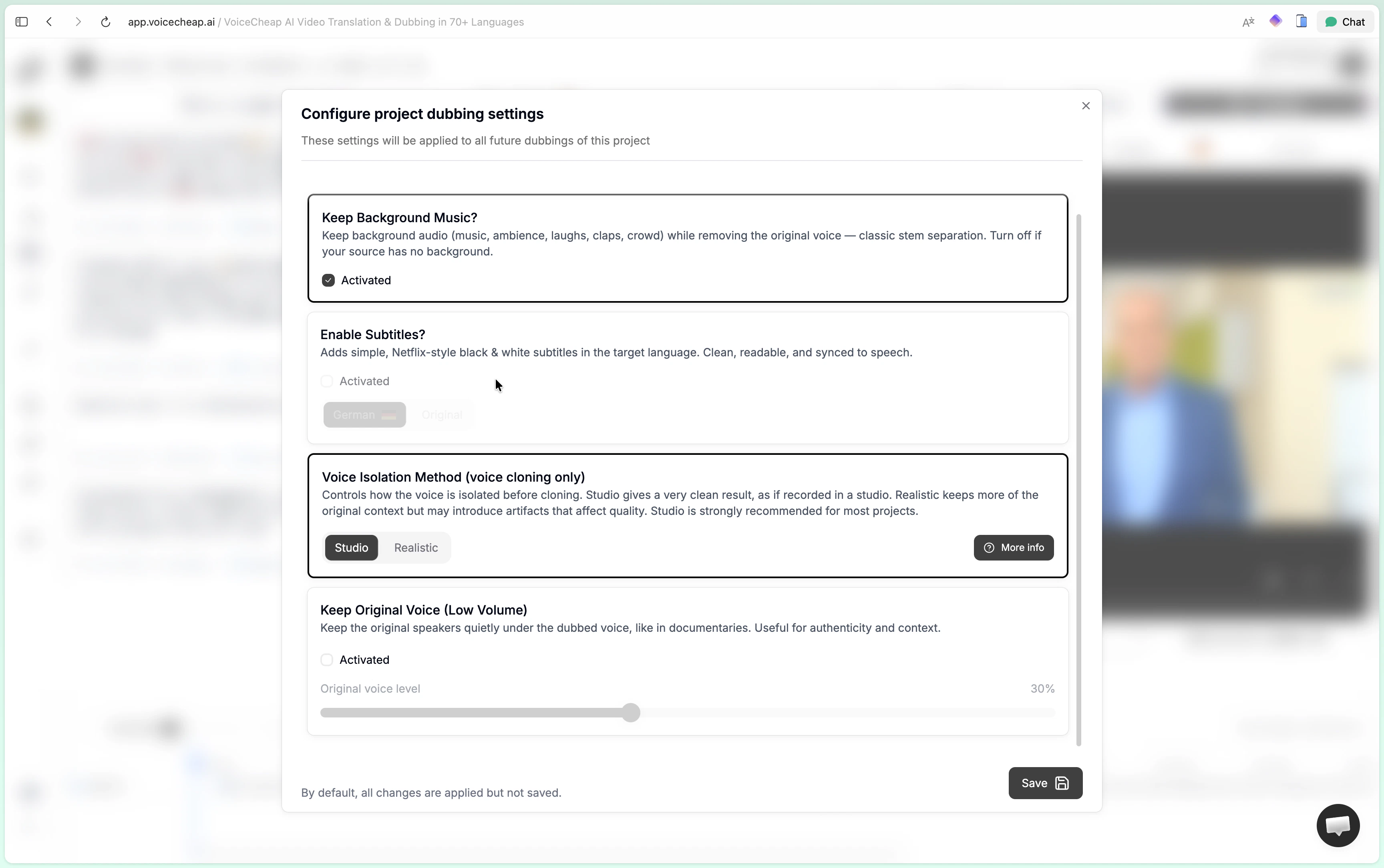
The project dubbing settings modal is the main place to shape how a translated version will sound and what it should include. These settings are the best next step right after project creation.
 ## The three tabs
The modal is split into three sections:
* `Dubbing settings` for background audio, subtitles, and voice isolation
* `Voices` for voice cloning, voice library, and custom voices
* `Instructions` for concise style guidance that shapes the translation
## Dubbing settings
### Keep background music
This option is enabled by default.
When enabled, VoiceCheap keeps the non-speech layer from the original source:
* music
* ambience
* laughs
* claps
* crowd noise
* other background sound
The original voice is removed while the background layer is preserved. In most cases, this is the recommended choice.
When to turn it off:
* podcast-style content with almost no real background layer
* cases where you want a fully clean dub without ambient carryover
* sources where stem separation would create more artifacts than value
### Enable subtitles
Subtitles are optional. VoiceCheap uses clean, readable, cinema-style subtitles rather than animated creator subtitles.
You can choose:
* subtitles in the target language
* subtitles in the original language
Subtitle placement and timing adapt to vertical and horizontal video layouts. You can also export both the original SRT and the translated SRT from the download menu after generation.
### Voice isolation method
This option matters for voice cloning. It controls how the voice is isolated before cloning.
`Studio` is the recommended default for most projects.
It is designed for cleaner, more professional cloning:
* removes echoes and reverberation
* cleans technical imperfections
* produces a crisp voice that feels closer to a studio recording
Best for tutorials, educational videos, interviews, explainers, and most business content.
`Realistic` keeps more of the original recording character.
It can feel more natural in some cases, but it also carries more risk of artifacts:
* preserves more environmental context
* can feel closer to the original environment
* may reduce cloning quality if the source is noisy
Best for vlogs, documentaries, or content where the original ambience matters to the perceived authenticity.
You can change this setting later and regenerate voice previews if needed.
### Keep original voice
This option is off by default.
When enabled, VoiceCheap keeps the original speaker quietly underneath the dubbed voice. This can work well for documentary-style delivery, voiceover explainers, or cases where you want a trace of the original performance to remain in the mix.
## Voices
The `Voices` tab gives you three voice strategies:
* [Voice cloning](/docs/voice/voice-cloning)
* [Voice library](/docs/voice/voice-library)
* [Custom voices](/docs/voice/custom-voices)
Use voice previews when available before committing to a full translation run.
## Instructions
The `Instructions` tab uses the same translation-guidance concept as the customization settings page. Keep instructions concise and style-focused.
Examples:
* YouTube-friendly tone
* neutral wording
* avoid slang
* sound more educational
Prefer English instructions for the most consistent results.
## Related pages
* [Customize translation projects](/docs/dubbing/customize-a-project)
* [Voice overview](/docs/voice/overview)
* [Custom translation instructions](/docs/customization/custom-translation-instructions)
## The three tabs
The modal is split into three sections:
* `Dubbing settings` for background audio, subtitles, and voice isolation
* `Voices` for voice cloning, voice library, and custom voices
* `Instructions` for concise style guidance that shapes the translation
## Dubbing settings
### Keep background music
This option is enabled by default.
When enabled, VoiceCheap keeps the non-speech layer from the original source:
* music
* ambience
* laughs
* claps
* crowd noise
* other background sound
The original voice is removed while the background layer is preserved. In most cases, this is the recommended choice.
When to turn it off:
* podcast-style content with almost no real background layer
* cases where you want a fully clean dub without ambient carryover
* sources where stem separation would create more artifacts than value
### Enable subtitles
Subtitles are optional. VoiceCheap uses clean, readable, cinema-style subtitles rather than animated creator subtitles.
You can choose:
* subtitles in the target language
* subtitles in the original language
Subtitle placement and timing adapt to vertical and horizontal video layouts. You can also export both the original SRT and the translated SRT from the download menu after generation.
### Voice isolation method
This option matters for voice cloning. It controls how the voice is isolated before cloning.
`Studio` is the recommended default for most projects.
It is designed for cleaner, more professional cloning:
* removes echoes and reverberation
* cleans technical imperfections
* produces a crisp voice that feels closer to a studio recording
Best for tutorials, educational videos, interviews, explainers, and most business content.
`Realistic` keeps more of the original recording character.
It can feel more natural in some cases, but it also carries more risk of artifacts:
* preserves more environmental context
* can feel closer to the original environment
* may reduce cloning quality if the source is noisy
Best for vlogs, documentaries, or content where the original ambience matters to the perceived authenticity.
You can change this setting later and regenerate voice previews if needed.
### Keep original voice
This option is off by default.
When enabled, VoiceCheap keeps the original speaker quietly underneath the dubbed voice. This can work well for documentary-style delivery, voiceover explainers, or cases where you want a trace of the original performance to remain in the mix.
## Voices
The `Voices` tab gives you three voice strategies:
* [Voice cloning](/docs/voice/voice-cloning)
* [Voice library](/docs/voice/voice-library)
* [Custom voices](/docs/voice/custom-voices)
Use voice previews when available before committing to a full translation run.
## Instructions
The `Instructions` tab uses the same translation-guidance concept as the customization settings page. Keep instructions concise and style-focused.
Examples:
* YouTube-friendly tone
* neutral wording
* avoid slang
* sound more educational
Prefer English instructions for the most consistent results.
## Related pages
* [Customize translation projects](/docs/dubbing/customize-a-project)
* [Voice overview](/docs/voice/overview)
* [Custom translation instructions](/docs/customization/custom-translation-instructions)